
Overview
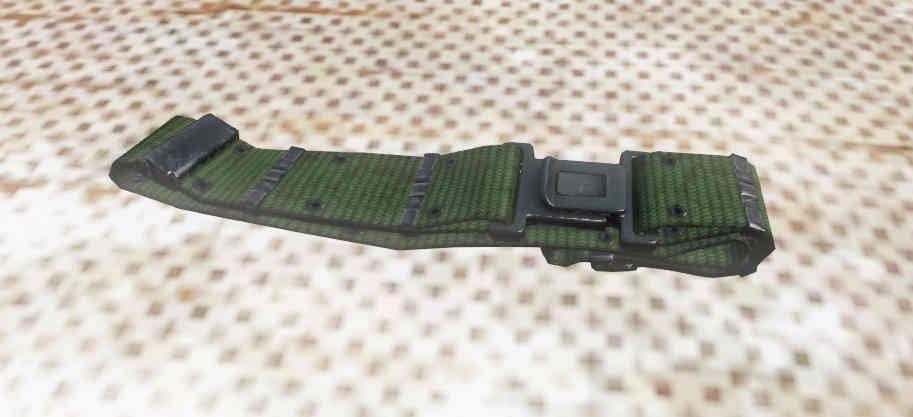
- LODs
- 8
- Vertices
- 1,441
- Faces
- 724
- Textures
- 1
- Materials
- 2
- Proxies
- 6
- Size (X × Y × Z)
- 0.405 × 0.809 × 0.308 m
CfgModels · mil_belt_g — Sections
ODOL Flags 37
Size
Flags
Model
Mass
Map
Bounds
Centers
ByteIndices
Level of Detail 8
1.000 789 verts 412 faces 1 tex
Proxies (3)
dz\characters\belts\proxies\belt_back_proxydz\characters\belts\proxies\belt_left_proxydz\characters\belts\proxies\belt_right_proxy
Named selections (2)
Textures
#(argb,8,8,3)color(0.415686,0.556863,0.34902,1.0,co)
Materials
dz\characters\belts\data\mil_belt.rvmat
2.000 363 verts 161 faces 1 tex
Proxies (3)
dz\characters\belts\proxies\belt_back_proxydz\characters\belts\proxies\belt_left_proxydz\characters\belts\proxies\belt_right_proxy
Named selections (2)
Textures
#(argb,8,8,3)color(0.415686,0.556863,0.34902,1.0,co)
Materials
dz\characters\belts\data\mil_belt.rvmat
3.000 171 verts 83 faces 1 tex
Proxies (3)
dz\characters\belts\proxies\belt_back_proxydz\characters\belts\proxies\belt_left_proxydz\characters\belts\proxies\belt_right_proxy
Named selections (2)
Textures
#(argb,8,8,3)color(0.415686,0.556863,0.34902,1.0,co)
Materials
dz\characters\belts\data\mil_belt.rvmat
4.000 73 verts 41 faces 1 tex
Proxies (3)
dz\characters\belts\proxies\belt_back_proxydz\characters\belts\proxies\belt_left_proxydz\characters\belts\proxies\belt_right_proxy
Named selections (2)
Textures
#(argb,8,8,3)color(0.415686,0.556863,0.34902,1.0,co)
Materials
dz\characters\belts\data\mil_belt.rvmat
Geometry 8 verts 6 faces 0 tex
Named selections (1)
Named properties (2)
| Name | Value |
|---|---|
| autocenter | 0 |
| invviewcameraroll | 0 |
Memory 12 verts 6 faces 0 tex
Other named selections (6)
Named properties (1)
| Name | Value |
|---|---|
| lodnoshadow | 1 |
View Geometry 8 verts 6 faces 0 tex
Named selections (1)
Fire Geometry 17 verts 9 faces 0 tex
Proxies (3)
dz\characters\belts\nylon_knifesheathdz\characters\belts\nylon_toolholderdz\characters\vests\plate_carrier_holster_g
Named selections (1)
Materials
dz\data\data\penetration\cloth.rvmat
model.cfg
class CfgModels
{
	class Default
	{
		Sections[] = {};
		SectionsInherit = "";
		SkeletonName = "";
	};
	class mil_belt_g: Default
	{
		Sections[] =
		{
			"camoground",
			"zbytek"
		};
	};
};
CfgSkeletons 0
No SkeletonBones in model.cfg.
CfgModels · mil_belt_g 2
Proxies 6
dz\characters\belts\nylon_knifesheathdz\characters\belts\nylon_toolholderdz\characters\belts\proxies\belt_back_proxydz\characters\belts\proxies\belt_left_proxydz\characters\belts\proxies\belt_right_proxydz\characters\vests\plate_carrier_holster_g
Textures 1
#(argb,8,8,3)color(0.415686,0.556863,0.34902,1.0,co)
Materials 2
dz\characters\belts\data\mil_belt.rvmatdz\data\data\penetration\cloth.rvmat